Self-Improvement’s ultimate goal? Creating James Bond villains

 Credit: http://filmonic.com/top-10-epic-james-bond-villain-deaths/
Credit: http://filmonic.com/top-10-epic-james-bond-villain-deaths/

One of my first coaches observed that the end result of self-improvement and motivational techniques is to create James Bond super-villains. Bond, on the other hand, embodies the exact opposite of those aspirational ideals.  

Consider: what marks the extreme Bond villains such as Ernst Stavro Blofeld, Dr. No, Hugo Drax, and Raoul Silva?  

  • They are ambitious. They think big, dream big, plan big.  
  • They take action on their vision.
  • They are single-minded in the pursuit of their goals and put in the hours to achieve those ends. (Work-life balance must be an adorable middle-class concept to a guy like Blofeld.)
  • Those big plans require extraordinary self-discipline to achieve. No villain binges Netflix. 
  • They are persuasive leaders who inspire loyalty, or at least command the loyalty, of other powerful people. 
  • They have no hangups about money, either getting more or hanging on to it. 
  • They leave no money on the table. They take the money and the table and then sell the table to get more money. 
  • They don’t care what people think or say about them. 
  • They have no issues with negative self-image or negative self-talk.
  • They don’t second-guess themselves. 
  • They set SMART goals and employ mind-boggling Gantt charts to help them achieve their (to them) utterly reasonable visions. A secret missile base inside a dormant volcano doesn’t just grow itself, you know. 
  • They exercise a tremendous organizational prowess to run tight, clockwork-precise organizations employing dozens or hundreds of people. 
  • They have no conception of “leaving their comfort zone” because their comfort zones cover a lot of ground. 
  • They have no filters on their personality, thinking, or behavior — they are who they are, like ’em or not. 
  • They do not ask for either forgiveness or permission. 
  • They think outside the box. 
  • They think win. Win. Win. 
  • They feel free to do whatever they want to do. 

Look at that list. Self-help books and motivational speakers by the hundreds build careers teaching only one or two of these attributes to their audiences. There is absolutely no reason in the world every villain on Her Majesty’s Shitlist should not succeed with their diabolical plans. 

Yet into every scenario blunders that damnable James Bond: emotional, impulsive, instinctive, reactive; an opportunist who improvises without doing proper research; who acts inconsistently, impulsively, rashly; who is suspicious of everyone around him when he’s not manipulating them; who works hard instead of smart; who destroys years of delicate and methodical preparation in a few loud explodey minutes.  

The Bond villain is ruthlessly, terribly orderly and methodical, a top-down thinker, patiently building his organization step by step, consolidating gains and reversing losses. He’s even planned for his escapes in case things go wrong! Isn’t this type of worldly success and behavior what traditional mainstream self-help and motivational literature — especially those books sitting on the “Business & Economics” shelves — holds up as the ideal?  

James Bond, on the other hand, is the (secret) agent of chaos and destruction whose job is not to change the world, but, in a sense, to protect the status quo. Is he really the guy we’re meant to emulate?  

Of course, there are downsides to being a villain, too. 
DSL woes iii

Every couple of years something goes wonky with our DSL connection and it requires major intervention. A couple of years ago, I had two Frontier technicians in my office talking to a third who was at the local switch.

Yesterday, I had THREE Frontier technicians in my office. One of them was the first guy who came out over two weeks ago.

Restricting them to just the iMac connected via Ethernet to the modem sped things up a bit — no futzing with the Airport wifi settings.

After all three tested and tried their ideas, they wound up doing what I thought they’d have to do: switch out the modem for a newer model. In this case, an Arris NVG443B modem, which is a brand I’ve never heard of before.

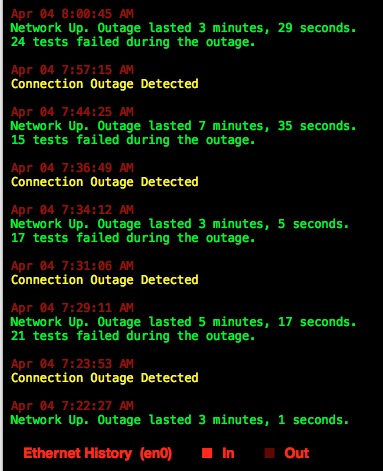
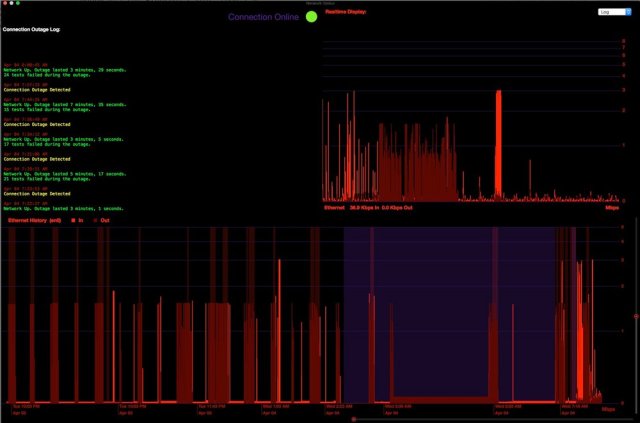
So far, so good. There were some teething problems early on as reported by Network Logger Pro, mainly Domain Name Server (DNS) outages. Network Logger has not reported any total outages since before the technicians came.

After an evening of iPad-surfing, Liz reported pages taking a long time to load, but they eventually did load and there were no outages. So the connection seems stable, though slower.

I ran the macOS-based Speedtest app and was discouraged to see our 3 mbps provisioned download speed drop to 1 mbps or less on several tests. Even though we experienced outages before, we got close to 3 mbps when the connection was up.

Update: I got 2.8 or 2.9 mbps late last night, but am barely scraping 1.5 this morning.

According to the modem’s built-in xDSL stats page, it’s seeing a downstream rate of 3360 kbps (so, about 3 mbps) and an upstream rate of 863 kbps. 

Hm. The modem seems to be receiving data at the provisioned rate, but on my Ethernet connection, I’m seeing 1 mbps or less. 

Hm. Network Logger Pro is showing now only DNS outages since the Frontier guys left. Fewer than before they arrived, but still…should I be seeing DNS outages at all?

On the old modem, for the last few years, I’d replace the default ISP DNS addresses with the Google DNS addresses or OpenDNS addresses. Supposedly, those server addresses resolve the domain names faster than the ISP’s DNS servers do. (There’s also a new entrant to the DNS space called Cloudflare.)

After some Googling around, here’s what I am doing, using Kim Komando’s DNS article as my guide. 

  1. Removed the Google DNS numbers from Airport Utility and the macOS Network System Preferences pane. They automatically reverted to the ISP’s DNS servers. It seems you can set the new DNS addresses at the modem, router, or device level. I’m keeping the modem’s DNS settings untouched for now; I don’t want to give Frontier ammunition for saying I mucked up their modem settings.
  2. Flushing the DNS cache (for both computers and browsers) was a new idea for me. Flushing the cache on High Sierra required a special syntax. This required me to log in as the administrator on my Mac to run the Terminal command, since having a separate administrator account is considered good practice.
  3. I downloaded Kim’s recommendation of namebench, whose purpose is to discover the fastest DNS servers for your geographic area. I ran it but I would not recommend using it. It was last updated in 2010 and there are few recent references to anyone using it. Namebench recommended Ultradns-2 as the fastest DNS address server, but I will likely go with Cloudflare as primary and Google as secondary, since they’re more recent and up to date.
  4. I added 1.1.1.1 (Cloudflare) and 8.8.8.8 (Google) as DNS addresses to the Airport. So our wifi devices should be OK. 
  5. For my iMac, I’m connected to the modem via Ethernet, so I’m using Frontier’s default DNS resolvers. 
  6. Liz and I will do our normal surfing to see if speed and stability are better. 
  7. If the speeds are still slow, place another call to Tech Support.

I’m not a tech guru by any means, and network stuff brings me to my knees. What I’ve been documenting in this series is what I know to do, given my paltry knowledge and Googling around. How do normal people deal with this stuff?

Update: Komando wrote about Netflix’s Fast.com site. I’m checking its results against Speedtest to see if they agree.


For further reading

The Literary Hub‘s daily newsletter and Austin Kleon’s weekly newsletter are delights to receive. 

I decided at one point in my life that I never wanted to be anything that would not allow me to be anything else I wanted to be … I ended up being nothing that I can currently identify, which I suppose means I got my wish.

Alexander Theroux

from “Laura Warholic”

DSL woes ii

Last night, I purchased and installed from the Mac App Store the program Network Logger Pro ($9.99). 

Despite my belief that the Airport Time Capsule is not the problem with our connectivity, I still had to consider the possibility that it might be. So I started researching wifi problems with Airport Time Capsules. I compiled a small checklist of wifi settings to try in the Airport Utility (such as changing ipv6 to “link-local only”). 

I also discovered that the ATCs have a lifespan of 3-5 years — not only for the hard drive, but also for the wifi components. Apparently, they get hot and wear down over years of being on all the time. So the ATC could be part of the problem after all. That is disappointing, but good to know. Time to start pricing another external drive and a new wifi router.

But let’s take the ATC out of the equation: if I was relying just on the Frontier modem, would I still  experience network outages?

So I started looking for programs or terminal commands I could use to create a log file to show that the outages are coming from the modem, not the ATC. It was during this research that I discovered Network Logger Pro. 

Therein followed a series of brainwaves.

  • Brainwave #1: I already have an extra-long Ethernet cable running from the ATC to the back of the iMac, so that I don’t need to be on wifi. 
  • Brainwave #2: The modem has an Ethernet port.
  • Brainwave #3: If I connect the iMac to the modem via the Ethernet cable, then I’m bypassing the ATC and getting the data directly.
  • Brainwave #4: With the ATC out of the equation, the Frontier tech guy has one less confounding variable to deal with.
  • Brainwave #5: If the modem-to-Mac connectivity is solid and steady, then the problem is the ATC. If the modem-to-Mac connectivity is choppy, then — if the line and signal are all working correctly — then the problem is the modem. (Just thought of another variable — the Ethernet cable. But it’s not pinched or bent anywhere, so that shouldn’t be a problem.)

It takes a while for me to put things together…

I installed Network Logger Pro, which has graphs and stuff I can’t begin to decipher. 

Now that my iMac is slurping data directly from the modem, Network Logger Pro records in its log the network up- and downtimes. Yes indeed, connected directly via Ethernet to the modem, I can see that I’m getting outages of several minutes at a time. 

So now I can call the tech guy, show him this log, and make the case that we should try a new modem. Once we’re sure the modem and line are working well on my iMac, then we can tackle any wifi problems the ATC may have.

Update: the Internet went down as I tried to post this from home. So I’m posting this from work.


Lenten learnings and Eastertide challenge

For Lent, I gave up listening to podcasts and adopted Mark Forster’s Fast FVP at work

Fast FVP worked great and accommodated a couple of enormous changes that occurred to me at my workplace. 

A pile o’ podcasts also silted up such that I could spend the next 50 days listening to them all. But I did get back to listening to audiobooks and other long-form items and webinar recordings I’d put off for “later.”

Accd to the calendar I’m referencing, Eastertide runs from April 1-May 20. So here’s what I’d like to do:

  • Continue using Fast FVP at work
  • Use the Next Hour (or other No-List system) at home
  • Interleave one audiobook a week with my podcasts. I usually listen to these things when I’m commuting or doing the dishes, so I can get through an 8hr audiobook in about 7-10 days. So maybe alternating weeks of audiobook and podcasts. We’ll see.


DSL woes

We’ve had very patchy Frontier DSL connectivity for over a week now. 

It’s uncanny that the DSL can work so flawlessly, so invisibly, that we take it for granted. But when connections are dropped and apps that normally update instantly instead stall out, then frustration rises.

I should say that everyone I’ve dealt with — Frontier’s telephone customer support and technicians — have been polite, respectful, and seem knowledgeable as they work through their troubleshooting steps.

Here’s what has happened since that first call:

  • The first customer support person did all the standard checks and nothing worked. She created a trouble ticket. (We’ve learned from past experience with Frontier that a trouble ticket number is crucial to getting some action taken.)
  • The first technician checked the lines and the signal was strong. He replaced the ADSL filter on the phone jack in my office (the only phone jack we use in the house).
  • He helped me set up a newer-model modem we got from Frontier in 2016 during another patchy DSL period. The connectivity problem at that time mysteriously resolved itself so we kept on with the old modem. If it ain’t broke, etc.
  • Even the technician had trouble activating the modem. So it was good I didn’t try it myself.
  • He introduced me to Speedtest.net, which Frontier techs like to use to test the line. I installed the free Speedtest app for my iMac, also. Works great.
  • I had 10 trouble-free minutes of internet and then it slowed and got patchy again.
  • We tried accessing either the Airport Time Capsule and the Frontier modem’s wifi networks, with disappointing results. The Time Capsule has been our default wifi/router for the past three years and has given us no trouble.
  • Called customer support this morning, fiddled with the modem settings per her instructions, and no joy. (She suggested I replace the 10′ cord running from the jack to the modem with a 6′ cord. The sys admin guys at work laughed their heads off when I told them that.)
  • The second technician met me at the house a couple of hours later (same-day service!). He rewired the box outside so only the one phone jack is connected to the DSL line. Prior to that, all four phone jacks in the house were receiving data.
  • Both technicians reported that the signal coming to the house and from the jack is strong.
  • The second technician’s hypothesis was that the Frontier modem installed last week had wireless turned on, and its signal was interfering with the Airport Time Capsule’s signal. So when we experimented last week with first one wifi signal and then the other, we made the problem worse because those signals were colliding and slowing all traffic down. He turned off the Frontier’s wireless signal.

The connection is still patchy, unfortunately. When the connection is up, the speed is acceptable. But the connection is not stable; we’re losing connectivity a couple of times an hour — sometimes a brief hiccup, other times for 20 minutes — which renders the download speed (we’re provisioned for 3 mbps) a moot point.

Today’s technician really thought the problem was the Time Capsule. I pushed back on that. Why would it suddenly go wonky after three years of no problems?

Our set up is this:

  • Phone cord from the jack to the modem. 
  • Ethernet cable from the modem to the Airport Time Capsule. The TC broadcasts the wifi signal.
  • Another Ethernet cable from the TC to my iMac. This effectively wires my iMac to the modem; I can turn off the iMac’s wifi and still access the internet.

I prefer having a wired connection to the modem so I can verify whether the patchy connectivity is coming from the wifi or the modem. If Liz’s iPad loses connectivity, I can verify via Speedtest whether I’ve also lost connectivity. If I have, the problem is the signal from the modem, not the Time Capsule.

Liz and I are both getting our internet via the Time Capsule (she via wireless, me via wired), so it could be the weak link. But I’m more suspicious of the Frontier modem. We’re an Apple household and I’m frankly loathe to believe this problem lies with the Time Capsule.

Connectivity is better today than yesterday, but not as stable as it was two weeks ago. We will give it a day or two under the normal stresses of email, transactions, streaming video, downloading, etc. 

Until I can take my connectivity for granted again, I will likely roam the Frontier for some time to come.

Pervasive language

We saw a trailer for an R-rated movie, and one of the rating justifications was for “pervasive language.”

“So that means it’s a ‘talkie’?” my friend said.

Apparently this odd wording has been remarked on since 2005 or so, but I had not noticed it till then.

Following is a paragraph from a 2009 MovieChopShop post on the MPAA’s vernacular:

And we all know about their little one-fuck, two-fuck rules that bump a PG-13 straight up to an R.  But why does Reservoir Dogs have “strong language” while The Departed has “pervasive language,” and Pulp Fiction has “pervasive strong language,” when they really all seem like they might as well be about the same?

The Merriam-Webster site says pervasive can be neutral (“a pervasive sense of calm”) but “is most often used of things we don’t really want spreading throughout all parts of something,” such as “a pervasive stench.”

The M-W site ends with a shoutout to the MPAA:

… Beginning in the early 1990s, the MPAA started giving the R rating to movies with “pervasive language.” Most movies have language throughout, of course. The MPAA is using the phrase “pervasive language” to refer to the frequent use of a particular kind of language: profanity.

Strong language? Profane language? Bankrupt language for an obsolete and purposeless ratings system?