LOGITECH K811 KEYBOARD


I had a full-sized wired aluminum Mac keyboard for years. I used it with the MacBook and later with the iMac.

After the 2015 break-in, the police came and did that thing that reassures homeowners but that rarely yields usable results: dusting for fingerprints.

That left me with a Mac keyboard that not only had a few letters (notably the “N” key) wearing off, but that sported coal-dust looking smudges over half the surface.

I got a Bluetooth Magic Keyboard with the new iMac after the burglary. It was OK but I never really got comfy with it. Its connection to the Mac would drop suddenly, or it would have trouble connecting on startup. I also thought the smaller size made typing feel cramped.

So I continued using the smudged, fading full-size keyboard. Which, because it was wired, took up one of the USB slots on the back of my new iMac.

For whatever reason, change is in the air. I heard Merlin Mann talk — was it on Mac Power Users? — about using a Bluetooth keyboard that with the touch of a button let him type on his MacBook, his iPad, or his iPhone. I finally tired of seeing this smudgy, fading keyboard. And I realized that I really envied the backlit keyboards; I tend to like having reduced light in my office in the evenings, and a backlit keyboard would make night-time writing and keying much more comfortable.

I went with the Wirecutter’s recommendation of the Logitech K811 and it has so far proved an excellent purchase. I had thought about getting a Matias aluminum keyboard with backlighting, but decided to go with the cheaper option first; if I didn’t like it, then I could justify spending more money for a demonstrably better keyboard.

Some notes on the K811:

  • It has a built-in rechargeable battery. I can charge it using the same micro-USB plug I use for several of my other devices. But it does not show percentage of remaining battery from the Bluetooth menu bar icon.
  • The backlit keyboard is wonderful. Just moving my hands in place over the keyboard will activate the backlight without my touching a key. I have the brightness set at just the right level to show the letters but not distract.
  • It can pair with three devices. It’s very simple to do this. I am running a Time Machine backup on my Mac and typing this on my iPad. With the press of a key, I can switch between the two computers. I’m leaving the third key unassigned for now.
  • I had to download software from the K811 support site to allow me to use some of the function keys (such as Mission Control) as the Mac Gods intended.
  • I had used the Magic Keyboard to write my blog posts on my iPad when we traveled recently. It worked fine, and I was planning to get a travel case for it. Now…I’m not so sure. The K811 has the same approximate dimensions, is lighter, and it’s backlit. This may become my travel keyboard.
  • The feel of the K811 is plasticky. It does not have the satisfying mass and density of the full-size keyboard it’s replacing. It feels durable enough.
  • I don’t like that the K811 lies flatter on the desk, with less tilt, than the Magic Keyboard. If I find this tiring during longer writing stints, I can glue some rubber feet to the bottom of the K811. 
  • The K811 has the chiclet keys that look and feel noticeably smaller than the Magic Keyboard’s keys. That said, I can type just as fast on them and the keys’ travel feels just right to me. 

I will keep the Magic Keyboard as a backup keyboard in case the K811 goes south for some reason. But for daily use on the iMac and occasional use on the iPad, the K811 has proven its worth. 

BACKUPS (cont’d)

So, backups.

  • On my Time Capsule (ca. 2015) I get the same bland unhelpful error message described on this blog post.
  • I got the same error message when I moved the Time Machine backup to my Western Digital 2TB external drive (ca. 2010). I’ve been using the latter mainly for miscellaneous photos, DVD rips, and the like. A junk drawer, of sorts, with not many valuables.
  • Is the problem the Time Machine software or the drives it’s writing to? I can’t tell.
  • I used Disk Utility to ‘repair’ both drives, which wound up deleting the last good Time Machine backup on the Time Capsule, and I think wrecked the WD2TB. I cannot now write or edit any file on the WD2TB.
  • Most hard drives have an average life span of about 5 years, so it’s past time to upgrade the WD2TB, I suppose.
  • I have key folders synced with Dropbox, and my and Liz’s user folders backed up to Crashplan. So our really critical stuff is still OK but it would take time to restore all those files. I would feel more comfortable with one or more full local backups.

Here’s my plan, such as it is:

  1. First, do no harm. Stop trying to repair these devices. It just seems to bollix them up more.
  2. Focus now on getting one or more reliable local backups of this iMac.
  3. Buy a 4TB external drive and plug it into the iMac. Use Disk Utility to format it and split it into two 2TB partitions.
  4. Use Carbon Copy Cloner to create a bootable backup on one of the partitions.
  5. Use Time Machine to create a versioned backup on the second partition. Cross my fingers that it will work.
  6. STOP! Get two local backups and verify they work before fiddling any further.
  7. Use Disk Utility to wipe and repair the WD2TB. If the drive continues to cause problems, securely wipe it and recycle it.
  8. Document our wifi settings in Time Capsule in case the next step clobbers them.
  9. Perform soft and hard resets on the Time Capsule as necessary to see if that will help kickstart Time Machine backups there.
  10. Take the damn thing to the Apple Store if I can’t get it working as I’d like. Has the disk gone bad? Do they need to puff more blue smoke into its inner circuitry?
  11. If it’s not the Time Capsule, but the Time Machine application? Lord, I do not want to go there.

I’m using Joe Kissell’s Backing Up Your Mac ebook as a guide for planning and thinking through the local backups.

EVERYTHING IS A MESS AND ALL IS WELL

At the start of Awareness, Anthony deMello shares the secret divulged by all mystics of all faiths,

[A]ll is well, all is well. Though everything is a mess, all is well. Strange paradox, to be sure. But, tragically, most people never get to see that all is well because they are asleep. They are having a nightmare.

I started writing a little list of various troubles – not great ones, but small ones – afflicting me at the moment:

  • The looming government shutdown does not bother me as much as the deadend nature of my job. Updating my LinkedIn and resume are dutifully done. There is not much to look forward to.
  • I continue to put off dealing with my long-term finances, a delay that I’m sure will bite me later.
  • My Time Capsule and an external drive have both decided to pack it in – I now have no backups of my iMac.
  • Squarespace promises a lot but in many small ways it disappoints.
  • My office, which I’d tidied just last week, is now a mess.
  • And on and on…

If deMello is right – and let’s assume he is – then all is well.

My job, my computer, my office, my finances, my health – they are my nightmare. They are real and cause anxiety only as long as I am in the dream.

But don’t they call out to me? Don’t I have these serious feelings to let me know that action must be taken?

Maybe. I find myself saying “We’ll see” a lot more lately.

Sometimes the best thing to do in an emergency, is nothing. My external drive is flaking probably because of something I tried without knowing what would happen.

First – particularly when we’re dealing with the physical world – do no harm. Don’t make things worse by taking unnecessary, thoughtless, fearful reactive action. If what looks to be a problem is just a nightmare, I could be making things worse.

One of my coaches, Mary Schiller, posted a video emphasizing one of her basic points: don’t take your thinking seriously. Don’t take your feelings personally. Our experience of life is bigger than our little thoughts, bigger than our overwhelming feelings.

Don’t get stuck there.

As deMello says later in that passage,

Waking up is unpleasant. It’s irritating to be woken up…Even the best psychologist will tell you that, that people don’t really want to be cured. What they want is relief; a cure is painful.

So how am I dealing with these – let’s call them “situations”?

I am copying the files that can be copied from my external drive to my iMac. I will go to work tomorrow. I will put a few things away to keep my office tidy.

When I don’t engage with the nightmare and fret about how awful it is, ideas come to me in the quiet. I try them out. I get more ideas.

I wake up a little before going back to sleep.

FROM CRASHPLAN TO BACKBLAZE

After I renewed my Crashplan subscription last August, they announced, bless their hearts, they were leaving the consumer space to focus on business-only plans.

The Crashplan folks have generally been derided and criticized for that, but let’s count our blessings.

  1. They did not just pull the plug on my account so the data is unavailable. That’s happened to me with other vendors.
  2. They are honoring my subscription, so that Crashplan is still backing up my files through August 2018.
  3. This gives me enough time to find another online backup provider and get in a full backup before my account shuts down.
  4. Given Crashplan’s exit from this space, many vendors are offering discounts or plans to transition Crashplan users to their new platform.

Crashplan had a functional, unlovely interface; still, it also sported a few features that other vendors did not have and it was rock-sl. So, moving to a new vendor will involve trade-offs.

My use cases for online backup are few: back up all my key documents (mainly my Documents and Photos folders), always be on in the background to upload new or changed files, and easy download or restoration of files.

Crashplan has worked in the background for the past 5 or so years. Once I set it up, I left it alone and never touched it again. I only really ever needed to recover files using Crashplan one time. But that one time was the Black Swan, the big event no one is expecting that has outsized consequences.

That event was the 2015 burglary of our house where the bad guys stole my MacBook and my wife’s laptop, among other small items.

Yes, I had a Time Machine backup … but we now had no Mac devices of any kind in the house.

I bought a Chromebook and was able to log in through Crashplan’s web interface to download and find information we needed. We were also able to download a zip file of specific files from my wife’s account to her Windows work laptop so she had her most-needed files at her fingertips.

When I bought an iMac as the new home computer, I installed Crashplan immediately and it is running to this day. I’ve never had to open it for any reason.

I’m going with the Wirecutter’s recommendation of Backblaze as my online backup provider.

Based on my use pattern, this is a service I will interact with very little once I have set it up. If I need something right away, then I’ll have Time Machine (if I ever get the blamed Time Capsule working again) or a bootable backup. But I feel more comfortable knowing that, in the case of another Black Swan, I have a safety net.

COFFEENOMICS

Liz and I have an informal tradition of going to a local bakery/deli place for
breakfast when there’s a federal holiday. It featured coffee urns in the center of the dining area where patrons could refill their cups. 

As the bakery is across the street from Duke’s East Campus, I’m sure people camped out at a table all day with free wi-fi for the price of a single bottomless cup of coffee.

The place just reopened after a few weeks of renovation. On ordering, we discovered that the “bottomless” cup of coffee was gone. Coffees are now refilled by the counter staff — and refills are $1.

The coffee instantly tasted less good.

I can’t say I blame the establishment for the policy change. Were I in their business, I’d probably do the same thing.

Nevertheless, we’re now looking for a new breakfast joint.


RESTARTING MY DIET, SUCH AS IT IS – 2

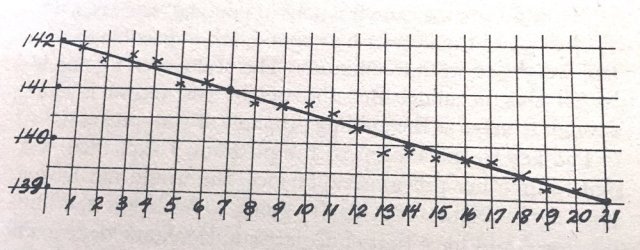
The key tool for me will be a weight-tracking chart made with pen and graph paper.

The chart format is described in the 1975 book Total Fitness in 30 Minutes a Week by Laurence E. Morehouse and Leonard Gross (long out of print). I first heard of this book through Mark Forster’s article.

The goal of the chart is to help you track losing a pound a week. This is a sustainable and non-superhuman rate of loss that should, we hope, prevent feelings of deprivation and will-power stuggles.

Here’s how Morehouse presents the graph in his book:

  • Dates run along the horizontal axis.
  • Weight is on the vertical axis. Each block on the graph represents a half-pound, so weight amounts are placed on every second line.
  • Starting from the upper left, count down two blocks and over seven. Make a dot. Continue counting down two and over seven, making a dot at each intersection, till you get to the lower right. In the image, those dots are on days 7, 14, and 21.
  • Use a ruler to draw a line from upper left to lower right connecting those dots.

That line determines your weight control program. My graph runs from 1/13 to 2/20, about 5 weeks. Every day I weigh myself, my weight will be above, below, or on the control line. For fractions of a pound, round up or down to the nearest half-pound.

Morehouse describes the protocol:

  • The objective is to always be on the control line.
  • If you’re below the line, eat what you want so you’re on the line tomorrow.
  • If you’re above the line, then reduce the food and increase physical activity so you’re on the line tomorrow.
  • By the end of the first week, you should know what foods or activity are needed to stay on or below the control line.

Morehouse makes the point that your daily weight will of course fluctuate for any number of reasons; some we can control, some we cannot. But for the purposes of this exercise, treat the weight as true and adjust accordingly. As Morehouse says,

We pay attention to the scale, particularly since it’s such a good source of motivation, but we don’t take it too seriously.

If you’re above the line for several days in a row, then it ain’t the weather; do what you need to do to bring your weight below the line. But if you’re below the line, hooray! Take advantage of the fluctuation.

Keep tracking your weight in this way till you reach your target weight. In my case I’d like to be 195 lbs. So, if all goes well, I’ll get there sometime in mid-May.

There are spreadsheets out there (the Hacker’s Diet being one) that track one’s weight daily and smoothe out the fluctuations. And any app store is lousy with weight trackers.

So why use pen and paper? For one thing, I like looking at the chart and seeing how long this will take. It reminds me that sustainable weight loss is a slow process – slower than I’d like, frankly. But whenever I’ve tried to lose faster than this, I would rebound to some degree. 

Making the chart involves me in the process and updating it every morning is also more active than simply typing my weight into an app. When I record the weight and note its position relative to the control line, I immediately begin planning my day’s eating and activities.

What do I do when I’m over the line? When I figure it out myself, I will post it here!

Graham Linehan on Sitcom Geek podcast

James Cary, writer of numerous UK radio and TV sitcoms and of the excellent Sitcom Geek blog and of the Kindle ebook Writing That Sitcom, is also a co-host with writer Dave Cohen of the Sitcom Geeks podcast. The man is about sitcoms.

Their podcast has just posted a two-part interview with the brilliant Graham Linehan, of Father Ted and IT Crowd fame. It’s now queued in Overcast on my iPhone and I can’t wait to listen.

RESTARTING MY DIET, SUCH AS IT IS – 1

I have paid for Herbalife, Diet Center (where I had to weigh in weekly and eat at least one large salad and one large apple a day), protein shakes, meal-replacement shakes, olive oil to do the Shangri-La Diet, lots of chicken breasts and veg for the South Beach Diet, lots of chicken, beans, and eggs for the Slow-Carb Diet, lots of potatoes for the Potato Hack, and a nutrition consultant, who is the only one who did me any real good – I lost 17 lbs. under her tutelage.

I have always been a fat kid and a plump adult. At one point in my 20s, I joined a gym and weighed in at about 250 lbs. I’m 6’3″, so some people were kind enough to say I carried it well, but still…I knew I could look and feel better.

At my lowest, I weighed 195 lbs., but I was so stressed out by the seeming chaos of my life at the time that I could not enjoy it.

I have purchased and read over my adult life maybe 25–40 books and ebooks on diet and eating.

There is always a new twist on old thinking, new takes on old food, and new perspectives on the bizarre problem of a fat society in a starving world. I am convinced now, based on the current science and thinking, that exercise is good for the body and the metabolism, but eating is what controls your weight.

There is a great little formula I picked up from somewhere on the ’Net:

  • When it comes to exercise: more is better than less, faster (or more intense) is better than slower, anything is better than nothing.
  • When it comes to food: less is better than more, eating slower is better than eating faster, nothing is better than anything.

For the last several years, I’ve settled on a few basics:

  • Real food, not packaged food.
  • More protein, more veg and fruit, fewer simple carbs.
  • If I snack, snack on protein.
  • No calories counting or food weighing.
  • Skipping a meal or fasting for 20–24 hours is easier than anything else I can do.
  • Know thyself and thy environment. As the week wears on, I am more susceptible to binging or eating foolishly. Plan for this. If I’m at a buffet or party, plan how I will eat so I don’t overindulge.
  • But sometimes, I’m going to binge. Forgive myself and get back on the horse.
  • Less is better than more, nothing is better than anything.

I sustained a weight of 203 lbs for most of 2017, till we travelled for two weeks through Nova Scotia, Cape Breton, PEI, and Grand Pre. We ate out for most of our meals, like you do.

I weighed 207 lbs when we returned in July and I could never get below that. With the gorgings of the holiday season just past – plus all the foodstuffs given to us and to each other as gifts – my weight has not gone below 210 lbs.

In the next post, I’ll lay out my current plan.

RESTARTING MY EXERCISE PROGRAM, SUCH AS IT IS

I went to the Y and aerobics classes in the ’80s, used the weight machines with my gym memberships in the ’90s, bought a NordicTrack, went to yoga classes, bought my own set of dumbbells, bought a dozen exercise tapes and DVDs, and I don’t know what all.

Since about 2007 or so, I settled on using kettlebells as my primary resistance and cardio fitness tool. After sustaining a shoulder injury using them in a group class setting, I now meet with a trainer every couple of months so she can correct my form and write out custom routines. While I like classes for some things, I prefer one-on-one coaching with the kettlebells – it’s too easy to hurt myself otherwise.

I had a pretty good kbell routine last fall, but a cold and then a cough that wouldn’t go away stopped me. One of my rules is to not work out when my body is fighting illness.

My method for starting or restarting a new routine is to take it slow. The goal for my current routine is to do 5 sets of exercises with a 35 lb. kettlebell. So tonight I did 2 sets with a 25 lb. bell. Next time I’ll do 3, and so on. When I’ve done a week or two of 5 full sets with 25 lbs. using excellent form, then I’ll start the 35 lb. bell with 1 or 2 sets and work my way up again.

After a six-week layoff, re-establishing the habit and routine of exercise is more important to me than hitting a weight or rep target. Planning which evenings I’ll exercise (I prefer exercising at home after work), setting up the space, doing my warm-ups – getting back into the rhythm of all of that is crucial.

Along with this vigorous exercise, I need to go back to walking more regularly (my FitBit daily goal is 10,000 steps, which I hardly ever hit in winter) and adding some sprints once or twice a week.

I also want to get back to a regular yoga routine. I sit so much during my days while the kettlebell work shortens the muscles. So stretching those muscles and realigning my posture 2–3 times a week is important as I enter my late 50s.